A three-product pet tech ecosystem designed in one semester — and what I learned about the cost of ambition
Problem
Pet cameras solved monitoring. But in interviews, owners didn't describe wanting to "check in" — they described wanting to play, to interact, to feel present. The problem wasn't visibility. It was the one-directional nature of every existing product.
The question wasn't "how do we let owners see their pets remotely?" — that's solved. The question was "how do we make remote interaction feel like being there?"
Solution
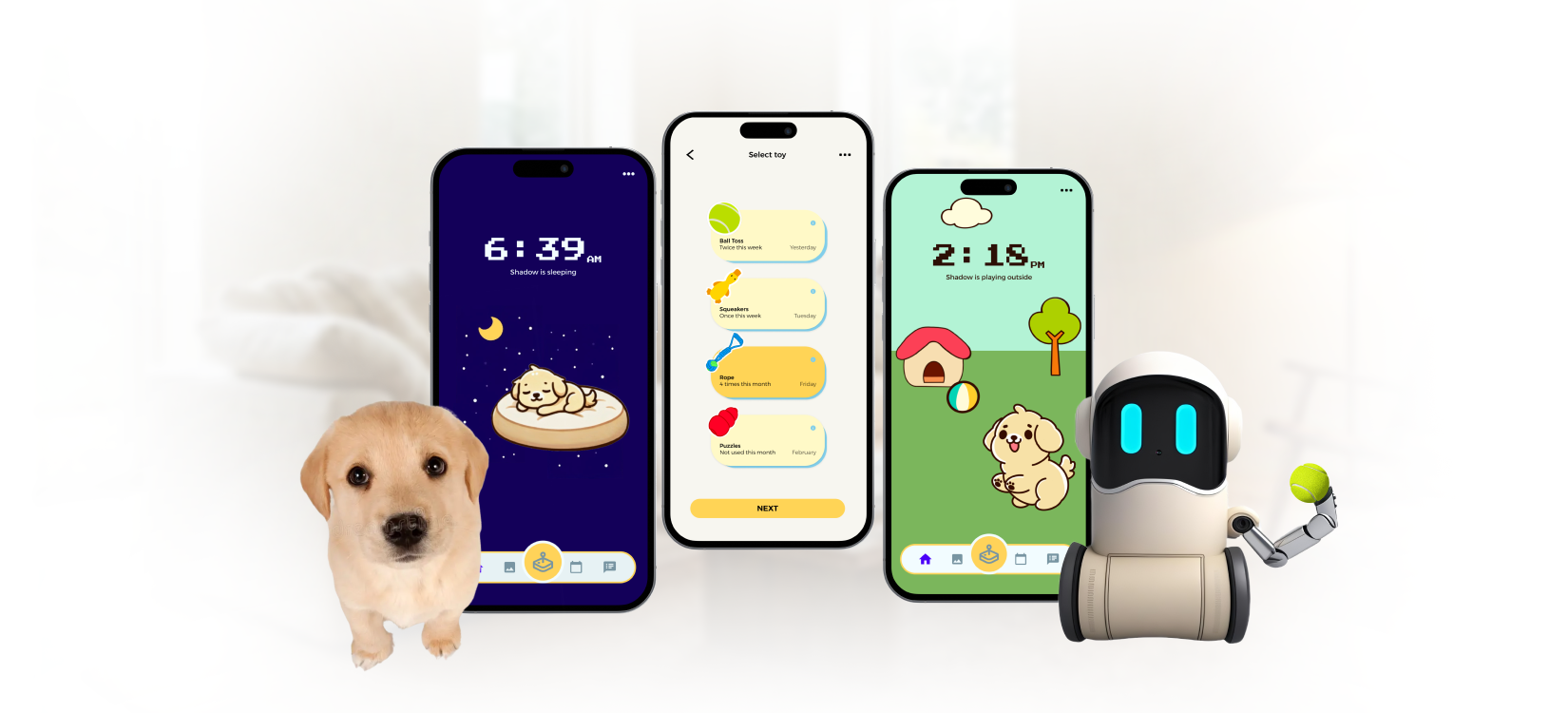
PawLink combines AR glasses, a mobile app, and a physical robot into a connected ecosystem. The ambition was intentional: no single product could bridge the emotional gap we found in research. But designing three products in one semester meant each got less depth than it deserved — a trade-off I'll address honestly in this case study.
The phone screen felt too small and too passive for play. AR overlays pet interaction onto the owner's real environment, making remote play feel physical rather than mediated.
The connective layer. Without a central hub, the glasses and robot would be isolated gadgets. The app orchestrates play modes, activity data, and caretaker access.
The pet-side presence. Someone has to actually throw the ball. The robot is the physical proxy that turns remote commands into real play.
Real-time data flow between AR Glasses, App, and Waggo Robot
Demo
Video placeholder — add Figma prototype recording or demo walkthrough
01 — Research
5 participants, ages 17-32. The surprise wasn't that owners felt disconnected — every pet-tech product starts with that assumption. The surprise was what they actually wanted:
Affinity mapping from survey and interview data
02 — Framing
Empathy-driven personas built from research findings
Mapping the emotional arc of separation revealed that anxiety peaks at two specific moments: right after leaving home, and during long stretches with no pet updates. These became our primary design targets.
Emotional highs and lows across a typical day away from a pet
03 — Ideation
Remote pet interaction has three distinct problems: the owner needs an immersive way to play (AR glasses), the pet needs a physical thing to play with (robot), and both need a system that coordinates it all (app). In the creative matrix, every single-product concept left at least one of these problems unsolved. That's why I committed to three. The trade-off was real: each product got roughly a third of the design depth it deserved. I knew this going in, and I'd make a different call today — but the ecosystem thinking itself was the right instinct.
Cross-referencing user needs with technology, then rapid sketching to explore form and interaction
04 — Lo-Fi Prototyping
The robot had to pass two tests: be approachable enough that pets engage with it, and be mechanically capable enough to actually play. Sharp edges, exposed joints, and top-heavy forms were all eliminated for safety reasons.
Physical form explorations for the Waggo robot
With three products funneling into one app, information architecture mattered more than visual polish. The wireframes focused on making product boundaries visible to users.
Information architecture and key task flows
05 — Testing
System Usability Scale testing with post-test interviews revealed a pattern: users understood each product individually but struggled with the connections between them. The ecosystem concept made sense in theory; in practice, it created navigation confusion and unclear mental models.
System Usability Scale results
06 — Iterations
The biggest iteration wasn't visual — it was structural. Testing showed that the problem was how the three products handed off to each other, not how each one looked individually.
Simplified mode switching based on usability findings
Reduced from 5 steps to 3
Final Design
Three distinct modes with clear visual separation — the fix for the mode confusion that surfaced in testing.
Automatically captured moments — a living photo album of your pet's day.
Redesigned after testing revealed that raw numbers didn't help owners understand their pet's day. Now shows narrative summaries alongside data.
Streamlined from 5 steps to 3 after testing. Share access with pet sitters or family in under a minute.
The system split into two modes: synchronous (real-time play via AR or app) and asynchronous (recorded clips, monitoring, activity logs). This distinction emerged from testing — users confused the two until we made the separation explicit.
What I'd do differently